Posts tonen met het label windows. Alle posts tonen

woensdag 13 juni 2012

Small change, Big difference!


Performance testing can save you a lot of time ;-) and money. While load testing the new site of Selor (recruitment agency/testing agency for the Belgium Government), We, the team, found that a lot of time was being wasted, in seemingly harmless code. It was only a few milliseconds, but in many places.
We came up with few hypotheses.
  • the new virus scanner, who caused some problems in the past few weeks.
  • the network disc.

After trying the first option, we saw a minor improvement.
But when hacking the application to use local disc, instead of a network drive, we had a factor 3 for normal response times. Not a bad start.

Result 

We asked for a new rolled out system, and made sure we were using local discs, where possible, using the network disc only for our most critical parts.

We can now handle 5-to-7 times more traffic then before, without degrading performance.
The customer and the team were thrilled with excitement. Being fast is cool!

Challenges?

The application is a modern SOA application, meaning a lot of remoting is going on. Without AppDynamics, we would have lot more hypotheses and many wiled gauze chases. But now we could see, where the time was being spend. => Don’t guess, but measure change!


(not a real example!)

Where to start?

Why no try the free lite version from AppDynamics, for Java and .NET.

donderdag 31 maart 2011

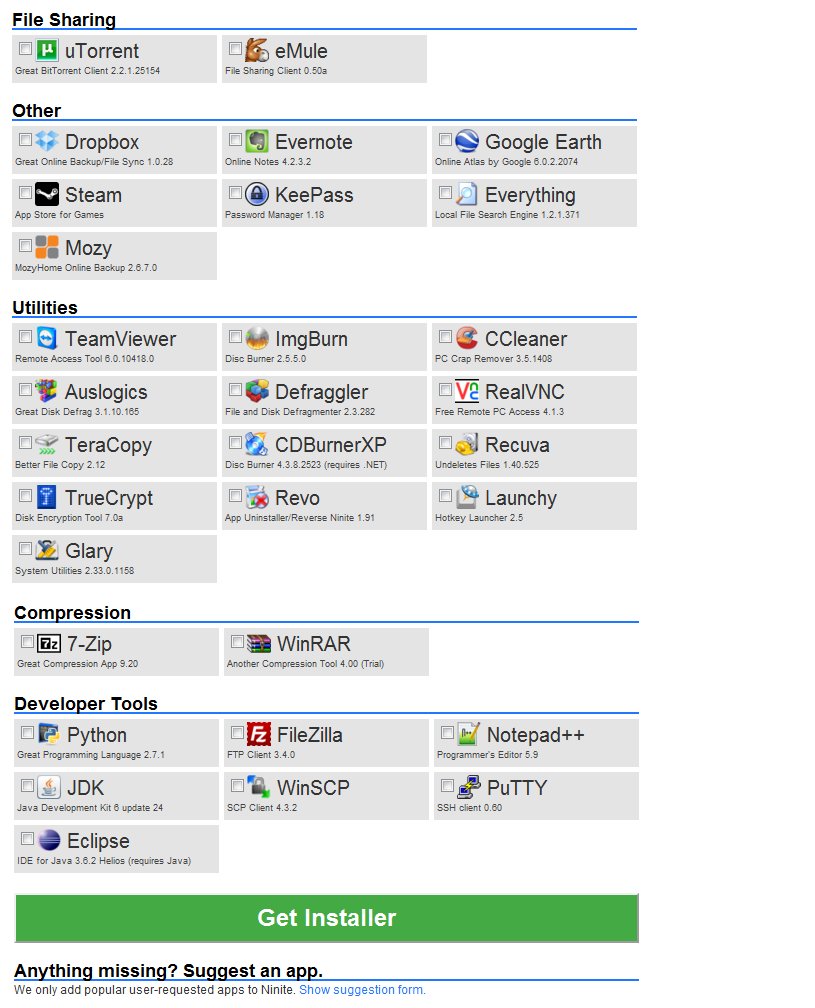
Ninite the automatic installer for all!

Ninite is an automatic FREE installer/updater for windows and linux.(yes even linux)

Where to use?


As an installer:


You just reformatted your pc, and you have a fresh windows. Instead of traveling the internet in search of your software, you can download all of your software latest version and everything will be installed automatically!

As an updater:


You are using an machine you haven't used for a while. The software is out of date. You can select the software you want, and the newest version will be installed for you.

How does it work?


Installing? Select the software you're interested, then download the auto installer and the rest is done by ninite.
Update? Select the software you want up to date, then download the auto installer and the rest is done by ninite.
Simple enough?


Advantage:


Windows? Time saved by searching on various websites.
linux? codecs, google-chrome, sun jdk. <== really annoyed this has been removed default from ubuntu.

url: http://ninite.com

Super screenshot: Check out all the software packages.


Try it now? It's Free!